


How to Pick the Right SATA Solid State Drive for Your Needs
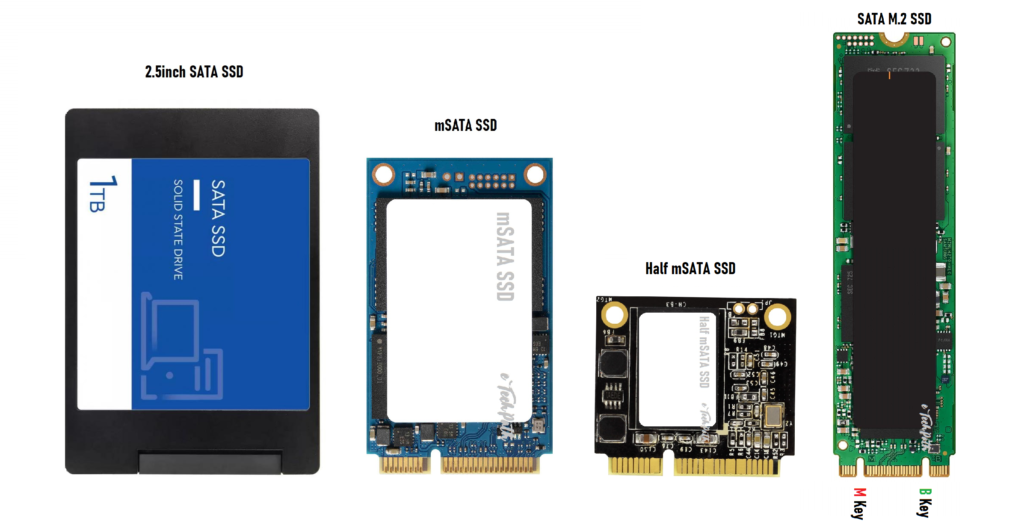
When it comes to upgrading a computer or improving system performance, one of the simplest yet most effective upgrades is switching from a traditional hard drive to a solid-state drive (SSD). But not all SSDs are created equal. Among the various types available, SATA SSDs remain one of the most common and affordable choices for both casual users and professionals. The challenge, however, is picking the right one that matches specific needs, workloads, and budgets. This guide explores how to choose the perfect SATA SSD by understanding its features, performance metrics, and ideal use cases, helping you make a smart investment that enhances both speed and reliability.
Understanding SATA SSDs
Before diving into how to choose one, it’s worth understanding what makes SATA SSDs different. SATA, or Serial Advanced Technology Attachment, is a type of interface that connects storage drives to a computer’s motherboard. It’s an older technology compared to NVMe or PCIe interfaces, but it remains highly popular for several reasons.
SATA SSDs provide a great balance between cost and performance. They may not reach the lightning-fast speeds of NVMe drives, but they’re still dramatically faster than traditional hard drives. For users upgrading older systems or those who don’t require extreme performance, SATA SSDs are often the most practical option.
What to Look for When Choosing a SATA SSD
When evaluating SATA Solid State Drives, several factors should guide the decision. Each feature plays a role in determining how the drive will perform in real-world tasks.
1. Storage Capacity
The first consideration is how much storage is needed. SATA SSDs come in capacities ranging from 120GB to 4TB or more. For light users who mostly browse, stream, or handle documents, 240GB or 500GB might be sufficient. Gamers, content creators, or professionals dealing with large files may prefer 1TB or 2TB models.
2. Read and Write Speeds
Although SATA SSDs are limited by the interface’s maximum throughput (around 600 MB/s), not all drives deliver equal performance. Some budget drives may have slower write speeds due to cheaper NAND types or a lack of a DRAM cache. Checking the manufacturer’s speed ratings and reviews can help identify models that maintain consistency under heavy use.
3. NAND Type and Endurance
SSDs use NAND flash memory to store data, and different NAND types, such as SLC, MLC, TLC, and QLC, offer varying levels of durability and performance. SLC (Single-Level Cell) is the fastest and most durable, but also the most expensive. TLC (Triple-Level Cell) is the most common, offering a good balance for general users. QLC (Quad-Level Cell) drives are cheaper but have lower endurance, making them better suited for lighter workloads.
4. Reliability and Warranty
A good SSD isn’t just about speed; it's about reliability. Look for drives with a solid track record of durability and a long warranty period (typically 3 to 5 years). Checking endurance ratings (measured in TBW, or terabytes written) can also provide an idea of how long the drive will last under consistent use.
5. Compatibility
SATA SSDs are compatible with most desktops and laptops that have a 2.5-inch drive bay or a SATA interface. However, it’s still important to double-check the physical space available in the device and confirm that the BIOS supports SATA connections.
Performance vs. Budget: Striking the Right Balance
Finding the right SSD often comes down to balancing speed, reliability, and cost. Budget-friendly options are perfect for everyday users who need faster boot times and quicker app launches. On the other hand, professionals handling intensive workloads or mission-critical data may want to consider models with higher endurance and consistent write performance.
If long-term reliability is a top priority, it might even be worth looking into an enterprise solid-state drive. These drives are designed for data centers and heavy workloads, providing superior endurance, error correction, and power loss protection. While they come with a higher price tag, the stability they offer can be invaluable for business environments or servers that demand 24/7 uptime.
Key Brands and Recommendations
Several reputable manufacturers dominate the SSD market, including Samsung, Crucial, Western Digital, Kingston, and SanDisk. Samsung’s 870 EVO series, for example, is well-known for its reliability and consistent speed. Crucial’s MX500 is another popular choice, praised for its affordability and endurance. When comparing models, it’s important to read independent reviews and performance benchmarks. Real-world testing often reveals how drives behave under different workloads, giving a more accurate picture than just theoretical specifications.
Tips for Getting the Most Out of Your SATA SSD
-
Keep firmware updated: Manufacturers often release updates that improve performance or fix stability issues.
-
Avoid overfilling the drive: Leaving at least 10–15% of free space helps maintain performance and prolongs lifespan.
-
Enable TRIM: Most modern operating systems do this automatically, but verifying it ensures better long-term health.
-
Use it for the right tasks: A SATA SSD is great for operating systems, applications, and game installations, but external backups might still be better suited to larger HDDs.
Final Thought
Choosing the right SATA SSD depends on your needs and performance goals. A mid-range 500GB model with strong reliability and warranty support suits everyday users, while professionals should consider higher-end drives with greater endurance and DRAM cache. Although NVMe drives offer faster speeds, SATA SSDs remain a cost-effective, dependable option for upgrades and system refreshes. For organizations requiring optimized and high-performance storage solutions, consulting specialists such as Cloud Ninjas LLC can ensure every setup is efficient, scalable, and built for long-term reliability.

 English
 Arabic
 French
 Spanish
 Portuguese
 Turkish
 Dutch
Dutch
 Italiano
 Russian
 Romaian
 Portuguese (Brazil)
 Greek
Greek