In today’s digital era, seamless connectivity is essential for every business, office, and organization. Whether you’re managing a small office network or a large enterprise infrastructure, network switches play a crucial role in ensuring smooth communication between devices. They are the backbone of modern networking — connecting computers, servers, printers, and other devices within a Local Area Network (LAN).
If you’ve ever wondered what a network switch does, how it differs from a router, and what features you should look for, this guide will cover everything you need to know.
What Is a Network Switch?
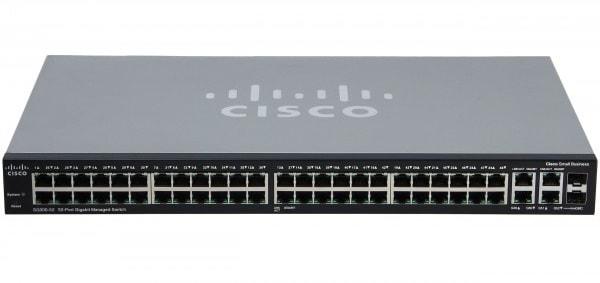
A network switch is a hardware device that connects multiple devices within the same network and allows them to communicate efficiently. It operates at the data link layer (Layer 2) or sometimes the network layer (Layer 3) of the OSI model.
In simpler terms, a switch works like a smart traffic controller for your network — directing data packets between connected devices so they reach their intended destination quickly and securely.
Without a switch, every device would try to communicate with every other device simultaneously, creating chaos and slowing down the network. By managing traffic intelligently, switches ensure optimal performance, minimal data collisions, and improved security.
How Does a Network Switch Work?
When a device on a network sends data, it is broken down into packets. Each packet contains the MAC address (Media Access Control) of both the sender and the receiver. The network switch reads these MAC addresses and determines which device the packet should go to.
Here’s how the process works step by step:
Learning: The switch learns the MAC addresses of connected devices and stores them in a MAC address table.
Forwarding: When a packet arrives, the switch checks its destination address and sends it only to the intended recipient’s port — not to every device on the network.
Filtering: If the source and destination addresses are the same, the switch ignores the data to avoid redundancy.
This selective communication reduces unnecessary traffic and ensures faster, more efficient networking.
Types of Network Switches
Different environments require different types of switches. Below are the main categories you’ll encounter:
1. Unmanaged Switches
Unmanaged switches are basic plug-and-play devices. They don’t require configuration and are best suited for small businesses or home offices where simplicity is key. They provide reliable connectivity without complex settings.
2. Managed Switches
Managed switches give network administrators full control over the network. They allow you to configure, monitor, and manage traffic, ensuring optimal performance and security. These switches are ideal for larger organizations or data centers that need advanced functionality.
Key features include VLAN support, traffic prioritization (QoS), port mirroring, and remote management via web interfaces or SNMP (Simple Network Management Protocol).
3. Layer 2 vs. Layer 3 Switches
Layer 2 Switches operate at the data link layer and use MAC addresses for data forwarding.
Layer 3 Switches can also perform routing functions using IP addresses, combining the functionality of switches and routers. They’re perfect for larger networks that require inter-VLAN communication.
4. PoE (Power over Ethernet) Switches
PoE switches can deliver power and data over the same Ethernet cable. They are essential for powering devices like IP cameras, VoIP phones, and wireless access points without needing separate power adapters.
5. Stackable Switches
Stackable switches can be physically connected to form a single logical unit. This design makes it easy to scale up your network without sacrificing performance or manageability.
Benefits of Using Network Switches
1. Improved Network Performance
Switches significantly enhance performance by managing data flow efficiently. They reduce collisions and ensure each device gets the bandwidth it needs.
2. Scalability
Adding more devices to your network? No problem. Switches make it easy to scale up your infrastructure as your business grows.
3. Enhanced Security
Managed switches offer features like access control lists (ACLs), port security, and VLAN segmentation — protecting sensitive data and minimizing unauthorized access.
4. Better Resource Management
Switches can prioritize network traffic, ensuring critical tasks like video conferencing or cloud applications get top performance.
5. Reduced Network Downtime
Advanced switches support redundancy features and automatic failover, helping to maintain uptime even if one connection fails.
Common Applications of Network Switches
Network switches are used across a wide range of environments:
Small and Medium Businesses: To connect PCs, printers, and shared storage.
Enterprises and Data Centers: To manage large-scale networking with thousands of connected devices.
Education and Healthcare: To ensure stable communication and data sharing across departments.
Retail and Hospitality: To connect security cameras, POS systems, and digital displays.
Smart Homes and IoT Networks: To connect devices like smart TVs, surveillance cameras, and home servers.
Key Features to Look For in a Network Switch
When purchasing a network switch, consider these essential features:
1. Number of Ports
Switches come in various port configurations — typically 5, 8, 16, 24, or 48 ports. Choose one that suits your current network while allowing room for future expansion.
2. Speed and Bandwidth
Gigabit Ethernet (1 Gbps) is the standard for most offices, but for high-performance networks, 10 Gigabit switches provide superior speed and throughput.
3. VLAN Support
Virtual Local Area Networks (VLANs) enable you to segment your network for security and efficiency. This is especially useful for separating departments or sensitive data.
4. Quality of Service (QoS)
QoS allows you to prioritize certain types of traffic — ensuring voice and video communications remain smooth even during peak usage.
5. Redundancy and Reliability
Features like dual power supplies, link aggregation, and automatic failover help prevent network interruptions.
6. Energy Efficiency
Energy-efficient switches automatically adjust power usage based on traffic and cable length, reducing energy costs.
7. Remote Management
Managed switches that support remote configuration and monitoring save time and allow for easier troubleshooting.
The Future of Network Switches
As businesses increasingly adopt cloud computing, IoT, and remote work environments, the demand for smarter, faster, and more energy-efficient switches continues to rise.
Future trends include:
AI-Driven Traffic Optimization: Automating performance adjustments based on network usage.
SDN (Software-Defined Networking): Centralized network control for flexibility and automation.
Energy-Efficient Ethernet (EEE): Lowering power consumption without sacrificing performance.
Edge Computing Integration: Supporting data processing closer to the source for faster response times.
These advancements ensure that network switches remain at the heart of modern connectivity solutions.
Why Choose Tecisoft for Your Networking Needs
When it comes to reliable and high-performance network switches, Tecisoft is a trusted destination for businesses and professionals alike. Offering a wide range of networking products from leading global brands, Tecisoft provides solutions tailored to every environment — from small offices to enterprise-level networks.
Tecisoft is known for delivering exceptional quality, expert support, and competitive pricing. Whether you’re upgrading an existing setup or building a new one from scratch, Tecisoft ensures you have the right switch for your needs — helping you achieve faster, more secure, and more efficient network performance.
Conclusion
In the digital age, the role of network switches cannot be overstated. They’re the foundation of reliable, high-speed communication — connecting devices, improving efficiency, and ensuring data flows seamlessly across networks.
From basic unmanaged models for small setups to advanced managed switches for large-scale infrastructures, there’s a perfect switch for every scenario. As technology evolves, switches are becoming smarter, faster, and more energy-efficient, paving the way for future-ready networking solutions.
And when you’re ready to invest in quality networking equipment, turning to a trusted provider like Tecisoft ensures that your business gets the best products, dependable performance, and expert guidance — keeping you connected in the world that never stops moving.




 English
 Arabic
 Spanish
 Portuguese
 Deutsch
 Turkish
 Dutch
Dutch
 Italiano
 Russian
 Romaian
 Portuguese (Brazil)
 Greek
Greek